 BUY NOW, PAY LATER. Starting at 0% APR


Can-Am WKP X3 Solid Motor Mounts
Installation instructions for the WKP X3 Solid Motor Mounts on the Can-Am Maverick X3 (SKU 804FC0120). Parts, tools, and full procedure.
In the box
Parts and tools
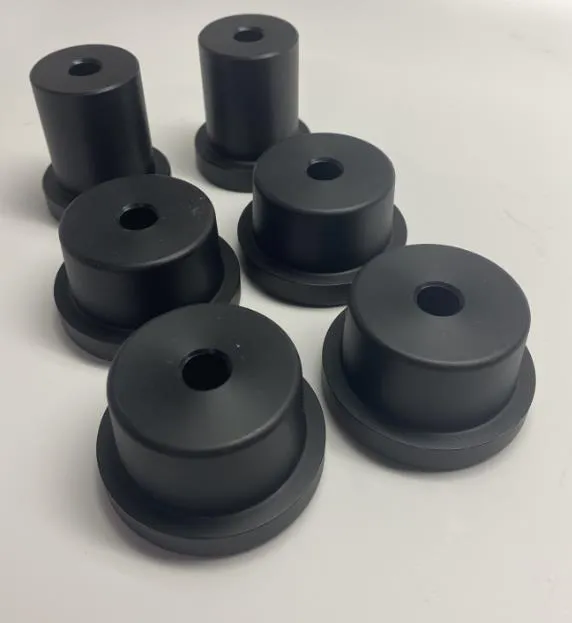
Included parts
- 4HD Motor Mounts
- 2HD Transmission Mounts
Required tools
- Hammer/Mallet
- 13mm Socket/Open End Wrench
- Flat Head Screwdriver
- Torque Wrench
Procedure
Installation Steps
- Step 1
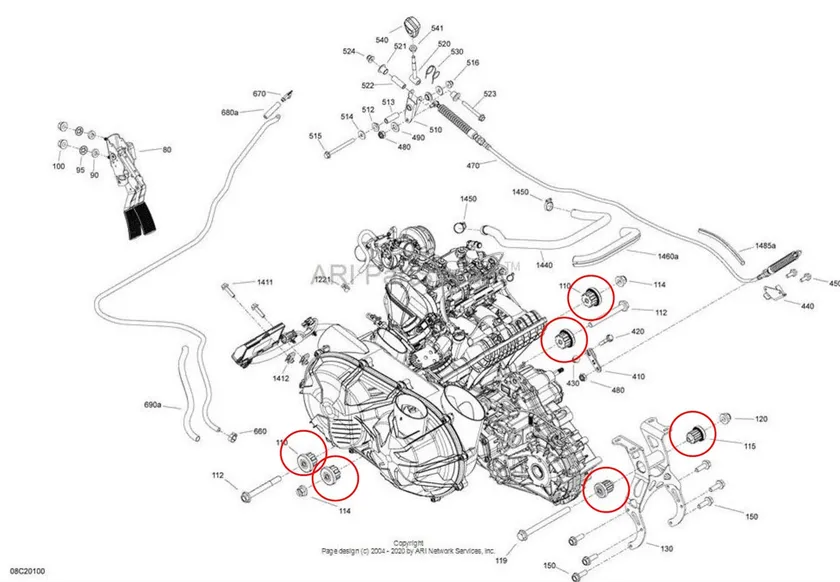
Disconnect all items attached to motor. See diagram below for reference. Motor/transmission mounts circled.
- Step 2
Remove motor from car.
- Step 3
Remove (4) OEM motor mounts on the front side of the motor.
- Step 4
Install (4) solid motor mounts, tap lightly with a mallet until the solid motor mounts are fully seated. Reuse OEM bolts.
- Step 5
Remove (2) transmission mounts located on the back of the motor.
- Step 6
Install (2) solid transmission mounts, tap lightly with a mallet until the solid motor mounts are fully seated. Reuse OEM bolts.
- Step 7
Reinstall motor and components back into car. Torque 13mm motor/transmission bolts to 37 ft lbs.
Need technical support?
Submit a ticket with your vehicle and what you're seeing, and our support team will get back to you.
