 BUY NOW, PAY LATER. Starting at 0% APR


Installation and multi-map calibration instructions for the Evolution Powersports Stock Turbo Mountain V-Map on the Arctic Cat Z1/Proclimb/Procross 1100T/9000. Covers ECU plug wiring, switch installation, the four selectable octane/horsepower switch positions, and clutching guidance.
Arctic Cat 9000/1100T V Map Stock Turbo Mountain
Evolution Powersports Stock Turbo Mountain V-Map install & multi-map calibration for Arctic Cat 1100T/9000: ECU wiring, 4 octane switch positions, clutching.
Reference
Overview
Reference
Stock turbo mountain V-Map multi map instructions
Warning
These instructions must be carefully adhered to!!! Failure to follow these instructions can result in engine damage.
Warning
This product requires mechanical skill and knowledge. Do not attempt to install this kit if you do not have the necessary skills!!!
Warning
Our EVOPS 1100T Boost Recirculation required for all big turbo installations horsepower tunes for safety!!!
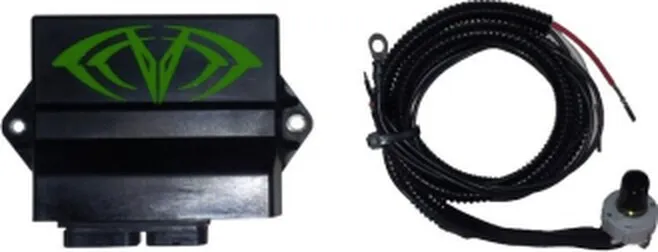
Photo of the V-Map ECU module (black box with the green EVP "V" logo) and its wiring harness/connector.
- Remove left side panel
- Remove both plugs from the ECU
- On the back side of the larger plug (that plugs into the ECU) remove the two white "plugs" from pin locations 29 & 30 (see the photo below)
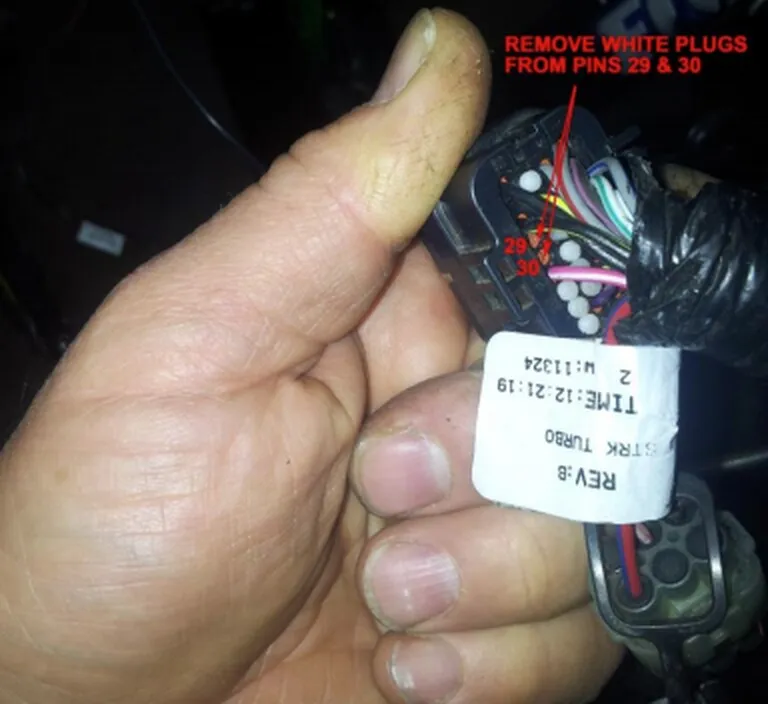
Close-up photo of the back of the larger ECU plug showing the two white plugs at pin locations 29 & 30 to be removed; a white "REV_B / STK TURBO" date-stamped tag is visible.
- Using a small screwdriver, push the ECU plug lock in (see picture below)
- Insert the red wire into plug location 29 and the white wire into plug location 30. Re lock ECU pins by depressing the white tabs on the oppsite side of the plug (note – the ECU will not lock if the pins are not inserted all the way)
- Run the black wire to the tree that houses the sensors or another good chassis ground (it is very important that this wire has a good ground.)
- Locate the switch on the part of the sled that the back of the hood slides into – the part that covers the aluminum manifold and fuel tank access. Mount it where you will not bump it with your knee while manuvering. Also, mounting it in this location will eliminate the need to unhook the harness if you remove the hood. Mount it so the switch knob protrudes through the top of the dash pod – this will protect the switch from water infiltration.

Close-up photo of a thumb pressing the ECU plug lock; a white date-stamped tag reading "REV_B / STK TURBO / TIME:12:21" is visible on the harness.
Reference
The octane ratings must be strictly adhered to:
| Switch position | Tune | Horsepower | Octane | Knob position |
|---|---|---|---|---|
| 1 | Super Stock | 91 (Safe on 89 octane, but ALWAYS use 91 if available) | Knob rotated all the way to the left (turned counterclockwise until it stops) | |
| 2 | 210 HP | 91 | 1 click clockwise from pos 1 | |
| 3 | 220 HP | 93 | 2 clicks clockwise from pos 1 | |
| 4 | 235 HP | 100 | 3 clicks clockwise from pos 1 |
Reference
Clutching
Clutch for 8100 RPMS – the tune makes more power and is safer at 8100 vs 7700
Emissions notice. This product is exempt from the emission standards and related requirements of 40 C.F.R. § 1051 as provided by 40 C.F.R. § 1051.620, and California law [e.g., vehicle code §§ 27156 and 38391]. This product is sold only for use in connection with EPA certified, purpose-built, nonroad vehicles used solely for closed course, nonroad competition/racing and not used for any recreational purpose or on public highways or right of ways maintained by and open to the public. This product is sold only in connection with machines that do not fall under state and/or federal noise or emission standards/regulations. Purchasers who/that purchase this product represent and warrant that the product is purchased only in connection with EPA-certified, emission-regulations-exempt and noise-regulations-exempt competition/racing vehicles as interpreted under applicable state and/or federal law.
Need technical support?
Submit a ticket with your vehicle and what you're seeing, and our support team will get back to you.
